Issue tracker
Track projects, issues and comments in a shared workspace that every open tab sees change live.
This demo is a small issue tracker. You create projects, add issues, rename them, move an issue between open, in progress and done, and write comments. A row of filters shows how many issues have each status. You set a display name, and the page shows it on your comments and on the issues you change. A project can have at most three issues in progress. Each workspace is one Streamsy stream, and the server uses that stream as its database. The page reads the same stream, so every tab on a workspace sees each change. Your own change shows at once, faded, and turns solid when the server confirms it. If the server refuses it, the change goes away and a short message says why. The "New shared workspace" button makes a new workspace with its own stream and a link that you can send to someone else.
This app is also the base for a set of variants. Each variant changes one side, the server or the browser, and keeps the product and the wire contract.
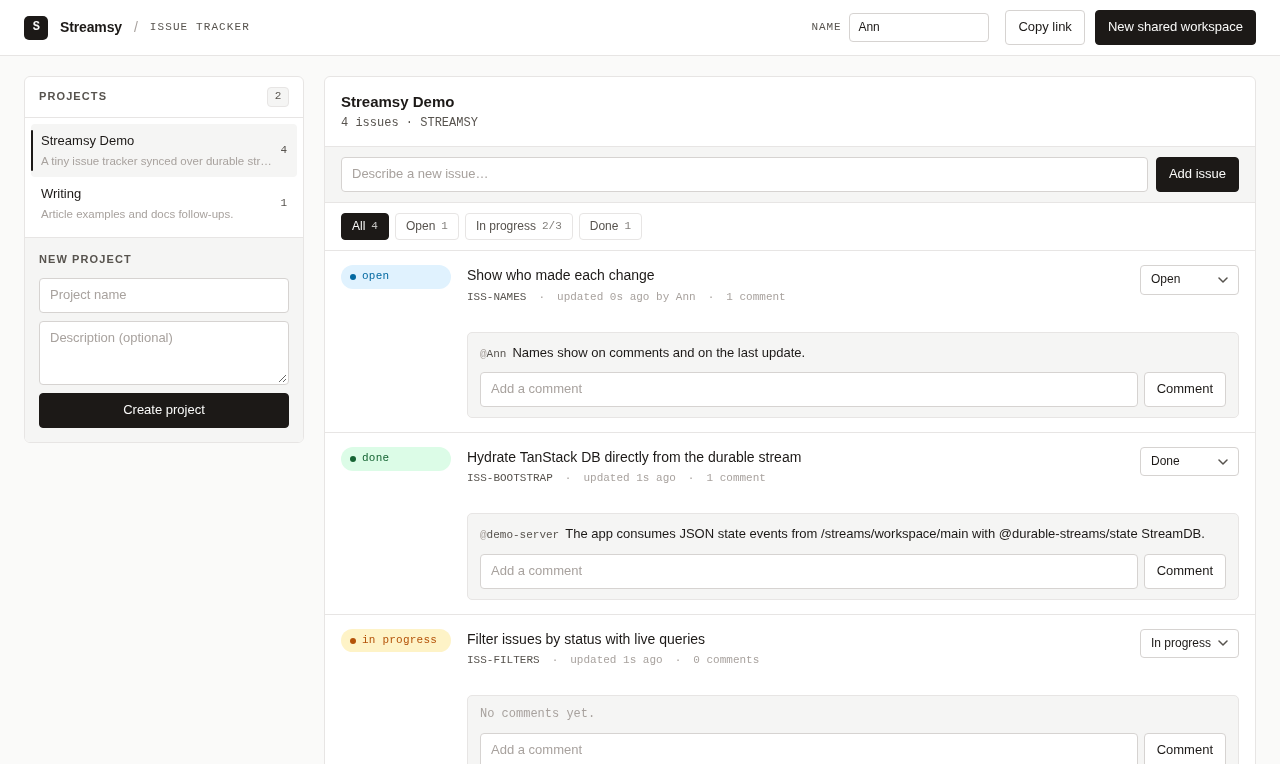
The full source is in examples/issue-tracker-demo. Its README lists the settings and the smoke test. The wire contract, the row schemas and the JSON API declaration, is the private package examples/issue-tracker-demo-contract. The variants import the same package. Excerpts from it have titles that start with issue-tracker-demo-contract/.
Run it
From the repository root:
bun install --frozen-lockfile
bun run build
bun run --cwd examples/issue-tracker-demo dev
Open http://localhost:1338. The server keeps workspaces in memory, so a restart starts again with the seeded main workspace. Set ISSUE_TRACKER_DB to a SQLite file path to keep workspaces across restarts.
To see the work-in-progress rule, open the page in two tabs. "Streamsy Demo" starts with two of its three places in progress. In each tab, move a different open or done issue to "In progress" at about the same time. One change stays. The other tab shows its change for a moment, then rolls it back with a message.
Architecture
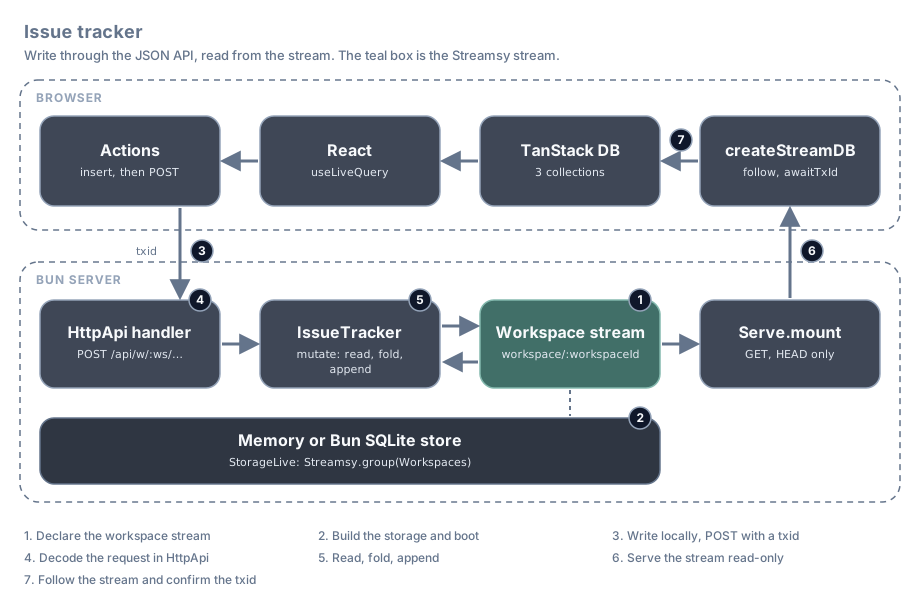
The server has no read API. Writes go through the JSON API, and reads come from the stream. Each number in the diagram is also the number of a section below.
| Step | What happens | Feature | File |
|---|---|---|---|
| 1 | One stream per workspace holds projects, issues and comments | Streamsy.state with collections | server/streams.ts |
| 2 | One layer graph opens the storage, seeds main and starts the listener | MemoryStorage.layer, BunStorage.layer, Streamsy.group | server/streams.ts, server/index.ts, server/issue-tracker.ts |
| 3 | The browser shows the change at once and posts it with a txid | Durable State client actions | src/db.ts |
| 4 | An HttpApi handler decodes the request and calls the domain service | Effect HttpApi | issue-tracker-demo-contract/api.ts, server/api.ts, server/routes/issues.ts |
| 5 | The service reads and folds the workspace, then appends if the stream did not move | decide, DurableState.changes | server/issue-tracker.ts, server/state.ts, server/streams.ts |
| 6 | The same router serves the stream for reads only | Serve.mount, Serve.layer, Serve.teardown | server/index.ts |
| 7 | The browser follows the stream and derives its views with live queries | Durable State client, TanStack DB | src/db.ts, src/App.tsx, src/queries.ts |
The code in each section is from the demo. Lines marked // ... are left out.
1. Declare the workspace stream
Workspaces is a Durable State stream. The id template workspace/:workspaceId gives each workspace its own stream, for example workspace/main. The stream has three collections. Each collection name is the type of its change events, and key names the field that identifies a row.
export class Workspaces extends Streamsy.state<Workspaces>()(
  "IssueTrackerDemo/Workspaces",
  "workspace/:workspaceId",
  {
    params: { workspaceId: Schema.String },
    collections: {
      project: { schema: Project, key: "id" },
      issue: { schema: Issue, key: "id" },
      comment: { schema: Comment, key: "id" },
    },
  },
) {}
Workspaces.at({ workspaceId }) gives the address of one workspace stream. The typed collections on that address check every change that the server writes. Project, Issue and Comment are Effect schemas in state-schema.ts of the contract package. The browser uses the same schemas.
2. Build the storage and boot
StorageLive gives the app its storage. With no database path the demo uses the memory store. With ISSUE_TRACKER_DB set it uses Bun SQLite. Both take a group of the streams that the app owns.
export const StorageLive = Layer.unwrap(
  Effect.map(ServerConfig, ({ databasePath }) => storage(databasePath)),
);

function storage(databasePath: Option.Option<string>): Layer.Layer<Workspaces, StorageFault> {
  return Option.match(databasePath, {
    onNone: () => MemoryStorage.layer(Streamsy.group(Workspaces)),
    onSome: (filename) => BunStorage.layer(Streamsy.group(Workspaces), { client: { filename } }),
  });
}
The whole server is one layer graph. Layer.provide builds its argument first and releases it last. So the storage opens first, then the IssueTracker service, then the seed step, and the listener starts last. On shutdown the order is the reverse, and the storage closes last.
const ServerLive = Serve.layer(RoutesLive, { disableLogger: true }).pipe(
  Layer.provide(ListenerLive),
  Layer.provide(SeedLive),
  Layer.provide(IssueTrackerLive),
  Layer.provide([StorageLive, BunCrypto.layer]),
);

BunRuntime.runMain(Layer.launch(ServerLive), { teardown: Serve.teardown });
A shared workspace exists only as its stream. POST /api/workspaces makes a random id, creates the stream and appends a starter project. The seed step does the same for main when that stream has no projects.
const create = Effect.gen(function* () {
  const bytes = yield* crypto.randomBytes(10);

  const workspaceId = Array.join(
    Array.map(Array.fromIterable(bytes), (byte) => (byte % 36).toString(36)),
    "",
  );

  yield* workspaces.create({ workspaceId });
  const starter = yield* stamp("proj");
  yield* append(workspaceId, projectUpsert(starterProject(starter), starter), ZERO_OFFSET);

  return workspaceId;
}).pipe(Effect.withSpan("IssueTracker.create"));
See Layers and storage.
3. Write in the browser first
The browser uses the Durable State client from @durable-streams/state. createStreamDB takes actions. Each action has two parts. onMutate inserts the new row into the local collection, so the page shows it at once. mutationFn posts the row to the API with a txid, then waits for the change with that txid to arrive on the stream. The body has no times. The server stamps them, and the row from the stream replaces the local row.
export function createIssueDb(workspaceId: string): IssueDb {
  // ...
    state: issueTrackerState,
    actions: ({ db }) => ({
      // ...
      createIssue: {
        onMutate: ({ issue }: CreateIssueAction) => {
          db.collections.issues.insert(issue);
        },
        // oxlint-disable-next-line effecttsgo/async-function -- TanStack DB awaits this mutation Promise and rolls back rejected writes.
        mutationFn: async ({ issue, txid }: CreateIssueAction) => {
          const body: IssueInput = {
            id: issue.id,
            projectId: issue.projectId,
            title: issue.title,
            status: issue.status,
            updatedBy: issue.updatedBy,
            txid,
          };

          const result = await postJson(apiUrl(workspaceId, "/issues"), body);
          await db.utils.awaitTxId(result.txid);
        },
      },
The component builds the local row and makes a new txid for each action. The browser picks the issue id, so the local row and the row from the stream have the same key. The local times only place the row until the stream row arrives.
const createIssue = async (title: string) => {
  if (!selectedProject) return;
  const now = DateTime.formatIso(DateTime.nowUnsafe());

  const unnamed: Issue = {
    id: newId("issue"),
    projectId: selectedProject.id,
    title,
    status: "open",
    createdAt: now,
    updatedAt: now,
  };

  const issue = writer === undefined ? unnamed : { ...unnamed, updatedBy: writer };
  await run(db.actions.createIssue, {
    issue,
    txid: Effect.runSync(browserCrypto.randomUUIDv4()),
  });
};
If the API call fails, the action fails and TanStack DB removes the local row. run catches the failure and shows the server's error message for a few seconds.
const run = async <T,>(action: OptimisticAction<T>, variables: T) => {
  try {
    await awaitOptimisticAction(action, variables);

    return true;
  } catch (error) {
    notify(error instanceof Error ? error.message : String(error));

    return false;
  }
};
4. Decode the request in HttpApi
The JSON API is an Effect HttpApi. api.ts in the contract package declares one group for each kind of row. Each write endpoint has a workspace id in the path, a body schema, a success schema and four error schemas. The issue endpoints have a fifth: WipLimitReached, on HTTP 422.
const inWorkspace = { ws: WorkspaceId };

const writeErrors = [BadRequest, NotFound, Conflict, InternalServerError];

/** An issue write can also break the work-in-progress rule. */
const issueErrors = [...writeErrors, WipLimitReached];
// ...
export class IssuesApi extends HttpApiGroup.make("issues").add(
  HttpApiEndpoint.post("create", "/w/:ws/issues", {
    params: inWorkspace,
    payload: IssueInput,
    success: IssueWritten.pipe(HttpApiSchema.status(201)),
    error: issueErrors,
  }),
  HttpApiEndpoint.patch("update", "/w/:ws/issues/:id", {
    params: { ...inWorkspace, id: Schema.String },
    payload: IssueInput,
    success: IssueWritten,
    error: issueErrors,
  }),
) {}
// ...
export class IssueTrackerApi extends HttpApi.make("IssueTrackerApi")
  .add(WorkspacesApi, ProjectsApi, IssuesApi, CommentsApi)
  .middleware(RequestErrors)
  .prefix("/api") {}
A body is a partial row. A missing field takes a server default. A field that is present must match the row schema. The optional txid must be a UUID. The body schema leaves out the time fields, because the server owns time.
export const TxId = Schema.String.check(Schema.isUUID());
// ...
const input = <
  Fields extends Schema.Struct.Fields,
  const Stamped extends ReadonlyArray<keyof Fields>,
>(
  entity: Schema.Struct<Fields>,
  stamped: Stamped,
) =>
  entity.mapFields((fields) => ({
    ...Struct.map(Struct.omit(fields, stamped), Schema.optionalKey),
    txid: Schema.optionalKey(TxId),
  }));

export const ProjectInput = input(Project, ["createdAt"]);

export type ProjectInput = typeof ProjectInput.Type;

export const IssueInput = input(Issue, ["createdAt", "updatedAt"]);
A request that fails its schema does not reach a handler. The RequestErrors middleware turns the schema error into a 400 with an error message.
const RequestErrorsLive = HttpApiMiddleware.layerSchemaErrorTransform(RequestErrors, (error) =>
  Effect.fail(new BadRequest({ error: requestError(error) })),
);
The handler gets the decoded path and body. It makes one stamp for the write: a new id, the time and the txid. Then it passes a validation step to tracker.mutate, which is section 5. The stamp is made once for each request, so a retry in section 5 writes the same id, time and txid. The update handler does the same with updateIssue.
export const IssuesLive = HttpApiBuilder.group(IssueTrackerApi, "issues", (handlers) =>
  Effect.gen(function* () {
    const tracker = yield* IssueTracker;

    return handlers
      .handle(
        "create",
        Effect.fn("issues.create")(function* ({ params, payload }) {
          const stamp = yield* tracker.stamp("issue", payload.txid);
          const written = yield* tracker.mutate(params.ws, createIssue(payload, stamp));

          return { issue: written.value, awaitOffset: written.awaitOffset, txid: stamp.txid };
        }, issueApiErrors),
      )
      .handle(
        "update",
        Effect.fn("issues.update")(function* ({ params, payload }) {
          const stamp = yield* tracker.stamp("issue", payload.txid);
          const written = yield* tracker.mutate(params.ws, updateIssue(params.id, payload, stamp));

          return { issue: written.value, awaitOffset: written.awaitOffset, txid: stamp.txid };
        }, issueApiErrors),
      );
  }),
);
apiErrors maps each typed failure from the domain to an HTTP error from the API declaration. issueApiErrors adds the work-in-progress rule. A 409 means "try again". A 422 means the rule refused the change, and the same request gets the same answer until the workspace changes.
const toApiError = (error: StoreError | DomainError) =>
  Match.value(error).pipe(
    Match.tag("WorkspaceNotFound", () => Effect.fail(new NotFound({ error: "Unknown workspace" }))),
    Match.tag("IssueNotFound", () => Effect.fail(new NotFound({ error: "Issue not found" }))),
    Match.tag("UnknownReference", ({ field }) =>
      Effect.fail(new BadRequest({ error: `Unknown ${field}` })),
    ),
    Match.tag("WriteConflict", () =>
      Effect.fail(new Conflict({ error: "Concurrent updates, please retry" })),
    ),
    Match.orElse((cause) =>
      Effect.logError(cause).pipe(
        Effect.andThen(Effect.fail(new InternalServerError({ error: "Internal server error" }))),
      ),
    ),
  );

export const apiErrors = <A, R>(handler: Effect.Effect<A, StoreError | DomainError, R>) =>
  handler.pipe(Effect.catch(toApiError));

/** Issue writes can also break the work-in-progress rule, which answers 422. */
export const issueApiErrors = <A, R>(
  handler: Effect.Effect<A, StoreError | DomainError | TooManyInProgress, R>,
) =>
  handler.pipe(
    Effect.catch((error) =>
      Match.value(error).pipe(
        Match.tag("TooManyInProgress", ({ limit }) =>
          Effect.fail(
            new WipLimitReached({ error: `This project already has ${limit} issues in progress` }),
          ),
        ),
        Match.orElse(toApiError),
      ),
    ),
  );
5. Read, fold, append
The validation step is a function of the workspace state. It returns the change to append and the value to answer with, or it fails with a typed error. It has no side effects, so a retry can run it again.
export const updateIssue =
  (issueId: string, input: Partial<Issue>, stamp: Stamp) =>
  (state: WorkspaceState): Effect.Effect<Mutation<Issue>, IssueNotFound | TooManyInProgress> => {
    const previous = state.getIssue(issueId);

    if (!previous) return Effect.fail(new IssueNotFound({ issueId }));
    const issue = nextIssue(previous, input, stamp);

    if (startsWork(state, previous, issue)) {
      return Effect.fail(new TooManyInProgress({ projectId: issue.projectId, limit: wipLimit }));
    }

    return Effect.succeed({ change: issueUpsert(issue, stamp), value: issue });
  };
The work-in-progress rule reads every issue of the project. A check like this is only safe if the state it reads is the state that the change lands on. Section 5 gives that guarantee.
function startsWork(state: WorkspaceState, previous: Issue | undefined, issue: Issue): boolean {
  return (
    issue.status === "in_progress" &&
    previous?.status !== "in_progress" &&
    state.countInProgress(issue.projectId) >= wipLimit
  );
}
To get that state, the service folds the whole workspace stream into a MaterializedState from @durable-streams/state. This is the same fold that the browser does. The server keeps no cache between requests. The validation step gets a read-only view of it.
const fold = (materialized: MaterializedState, event: WorkspaceEvent) => {
  if (StreamAddress.isChange(event)) materialized.apply(event);
  else if (event.headers.control === "reset") materialized.clear();

  return materialized;
};

const view = (state: MaterializedState): WorkspaceState => ({
  getProject: (projectId: string) => state.get<Project>("project", projectId),
  getIssue: (issueId: string) => state.get<Issue>("issue", issueId),
  hasProjects: () => state.getType("project").size > 0,
  countInProgress: (projectId: string) =>
    Array.filter([...state.getType("issue").keys()], (issueId) => {
      const issue = state.get<Issue>("issue", issueId);

      return issue?.projectId === projectId && issue.status === "in_progress";
    }).length,
});
mutate is the read, decide, append recipe in one workspaces.decide call. decide folds the stream and passes the state and the offset it read up to. The validation step runs on that state. The change is stamped with that offset, and the append uses the same offset as expectedOffset. If another request appended first, the tail has moved. The append then writes nothing and fails with OffsetMismatch. decide then folds the new events onto the state and validates again. So each change is checked against the state at the exact position where it lands. A domain failure appends nothing. After three retries the service fails with WriteConflict, and the API answers 409.
The work-in-progress rule shows why this matters. Two requests each move a different issue to "In progress" while the project has two. Both fold a head with two issues in progress, so both pass the rule. One append lands. The other gets OffsetMismatch, folds again, sees three issues in progress and fails with TooManyInProgress. Without the offset check, both appends would land and the project would have four. A missing stream becomes WorkspaceNotFound. Other store failures stay typed, and the API answers 500.
const mutate = <A, E>(
  workspaceId: string,
  attempt: (state: WorkspaceState) => Effect.Effect<Mutation<A>, E>,
) =>
  workspaces
    .decide(
      { workspaceId },
      {
        initial: () => new MaterializedState(),
        fold,
        // Each change records the head it was validated against as its source
        // offset; the same offset is the append's `expectedOffset`. A domain
        // failure is an answer at that head, so it appends nothing.
        decide: (state, { offset }) =>
          Effect.map(Effect.result(attempt(view(state))), (answer) => ({
            value: answer,
            items: Result.isSuccess(answer)
              ? workspaceEvents(workspaceId, offset, [answer.success.change])
              : [],
          })),
      },
    )
    .pipe(
      Effect.catchTag("OffsetMismatch", () => Effect.fail(new WriteConflict({ workspaceId }))),
      Effect.catchTag(
        ["StreamNotFound", "StreamGone"],
        () => new WorkspaceNotFound({ workspaceId }),
      ),
      Effect.flatMap(({ value: answer, offset }) =>
        Effect.map(Effect.fromResult(answer), ({ value }) => ({ value, awaitOffset: offset })),
      ),
      Effect.withSpan("IssueTracker.mutate"),
    );
DurableState.changes turns the change into the wire event for the workspace address. The demo has no upstream stream, so it records the head it read as the source offset.
export const workspaceEvents = (
  workspaceId: string,
  sourceOffset: string,
  changes: Array.NonEmptyReadonlyArray<WorkspaceChange>,
) => DurableState.changes(Workspaces.at({ workspaceId }), { offset: sourceOffset }, changes);
The builders put the txid and the server time in the change headers. An issue edit is also an upsert with the full issue. The server also owns the time fields in the rows: they come from the stamp, never from the request.
const headers = (stamp: Stamp) => ({ headers: { timestamp: stamp.now, txid: stamp.txid } });
// ...
export const issueUpsert = (issue: Issue, stamp: Stamp): WorkspaceChange =>
  DurableState.upsert("issue", issue, headers(stamp));
See Read, fold, append.
6. Serve the stream read-only
Bun bundles the HTML page and serves it for every other path. The false entries send every /api and /streams path on to the Effect router.
const ListenerLive = Layer.unwrap(
  Effect.map(ServerConfig, ({ port, isDevelopment }) =>
    BunHttpServer.layer({
      port,
      idleTimeout: serverIdleTimeoutSeconds,
      // The listener stops from its own scope once the open replies are sent.
      disablePreemptiveShutdown: true,
      routes: {
        "/api/*": false,
        "/streams": false,
        "/streams/*": false,
        // Bun bundles the HTML import (scripts, styles, assets) and serves it
        // for every other path.
        "/*": index,
      },
      // ...
    }),
  ),
);
One router holds the JSON API and the stream route. Serve.mount serves each workspace stream as Durable State at /streams/workspace/:workspaceId. The Workspaces codecs decode the path parameter. A PUT, POST or DELETE answers 405, so only the JSON API appends. A path that no route owns answers 404. Both parts use the same Workspaces service from the layer graph.
const RoutesLive = Layer.mergeAll(
  ApiLive,
  ApiNotFoundLive,
  Serve.mount(Workspaces, "/streams/workspace/:workspaceId"),
);
Serve.layer in section 2 serves this router. When the server stops, a parked long poll answers 204 at its offset. The browser then reconnects as it does after a normal long-poll timeout.
You can read a workspace with curl. It returns the change events as JSON:
curl -i 'http://localhost:1338/streams/workspace/main?offset=-1'See Serve handlers and Clean shutdown.
7. Follow the stream in the browser
The state schema maps each change type to a collection. The type names are the same as the collection names in Workspaces. The row schemas are the Effect schemas from section 1, converted to Standard Schema.
export const issueTrackerState = createStateSchema({
  projects: { schema: Schema.toStandardSchemaV1(Project), type: "project", primaryKey: "id" },
  issues: { schema: Schema.toStandardSchemaV1(Issue), type: "issue", primaryKey: "id" },
  comments: { schema: Schema.toStandardSchemaV1(Comment), type: "comment", primaryKey: "id" },
});
createStreamDB opens the workspace stream. It reads every change from the start, then follows new ones. This is also how awaitTxId sees the change that an action posted.
export function createIssueDb(workspaceId: string): IssueDb {
  const connection = trackConnection();

  const streamDb = createStreamDB({
    streamOptions: {
      url: streamUrl(workspaceId),
      contentType: "application/json",
      warnOnHttp: false,
      fetch: connection.fetch,
    },
    state: issueTrackerState,
The app waits for preload before it shows the tracker. A page load has one workspace, so a new workspace means a new page load.
useEffect(() => {
  let cancelled = false;
  const created = createIssueDb(workspaceId);

  void created.preload().then(() => {
    if (cancelled) {
      created.close();

      return;
    }

    setDb(created);
  });

  return () => {
    cancelled = true;
    created.close();
  };
}, [workspaceId]);
React reads the collections with live queries from TanStack DB. When a change arrives from any tab, or from a local optimistic write, TanStack DB updates each query result and React renders again. src/queries.ts holds every value that the page derives from the workspace, so a frontend variant can replace them as one unit. The issue list filters and sorts in the query:
export function useVisibleIssues(db: IssueDb, projectId: string, filter: StatusFilter) {
  const { data } = useLiveQuery(
    (q) => {
      const inProject = q
        .from({ issue: db.collections.issues })
        .where(({ issue }) => eq(issue.projectId, projectId));

      const filtered =
        filter === "all" ? inProject : inProject.where(({ issue }) => eq(issue.status, filter));

      return filtered.orderBy(({ issue }) => issue.updatedAt, "desc");
    },
    [projectId, filter],
  );

  return data ?? [];
}
The counts on the filter buttons are a grouped query:
      q
        .from({ issue: db.collections.issues })
        .where(({ issue }) => eq(issue.projectId, projectId))
        .groupBy(({ issue }) => issue.status)
        .select(({ issue }) => ({ status: issue.status, issues: count(issue.id) })),
Each row from a query keeps the $synced flag of its source row. It is false while the row has a local change that the stream has not confirmed. The issue list passes it to the row as pending, and the row shows faded.
<IssueRow
  key={issue.id}
  issue={issue}
  pending={!issue.$synced}
The stream reader uses a wrapped fetch that records whether the server answers. The client retries a failed read without limit, so the "Offline" badge in the header goes away when the server is back.
Limits
- Every write reads and folds the whole workspace. This is fine for a demo workspace. It does not suit a long history.
- There is no snapshot. A new page load replays every change in the workspace.
- The retry has no delay. Many writers on one workspace can use all three retries and get a 409.
- A display name is a label, not an identity. Anyone can type any name.
- A storage failure other than a moved tail stays typed, and the API answers 500.
- The memory store lasts for one server process. Use
ISSUE_TRACKER_DBto keep workspaces. - A workspace link is a random id. It is not access control. Anyone with the link can read and write the workspace.
- The demo has no hosted deployment.