Bugsy
Send issue commands to a server that keeps SQL tables, board rows, label counts and a change feed up to date.
Bugsy is the server side of an issue tracker. You send it commands: create an issue, change its status, assign it. The server stores each command as a fact in a stream. Two projections then keep the rest up to date: SQL tables for the API, and output streams with board cards, label counts and a feed of accepted changes. A client can follow those streams over HTTP. The demo has no browser, so this page has no screenshot.
The full source is in examples/bugsy.
Run it
From the repository root:
bun install --frozen-lockfile
bun run build
bun run --cwd examples/bugsy start
Open http://localhost:1340. The server keeps its data in a SQLite file in /tmp. Set BUGSY_DB to use a different file. The example README lists the other settings and the smoke scripts.
Architecture
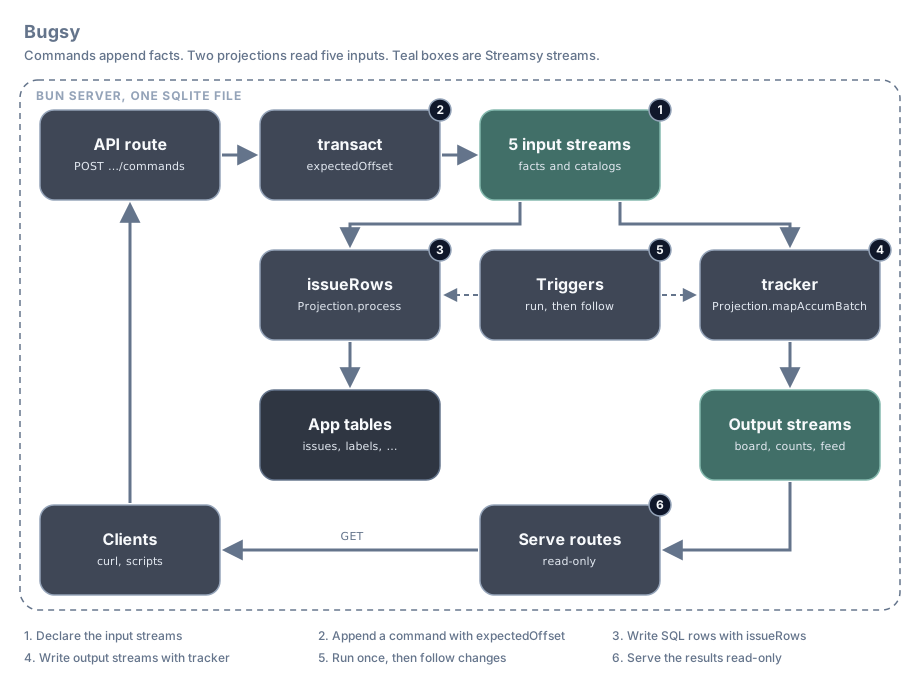
Each number in the diagram is also a section number below.
| Step | What happens | Streamsy feature | File |
|---|---|---|---|
| 1 | Five streams for each workspace hold the input facts | Streamsy.json, Streamsy.state | server/streams.ts |
| 2 | A command becomes one fact, appended only if the stream did not move | Projection.decide | server/state.ts |
| 3 | One projection writes the SQL tables in the checkpoint transaction | Projection.process, Commit.transaction, Projection.each | server/projection.ts |
| 4 | A second projection writes three output streams and a state value | Projection.mapAccumBatch, Commit.producer, DurableState | server/outputs.ts |
| 5 | Startup runs both projections, then watchers are the writers | Projection.run, Projection.follow | server/app.ts, server/host.ts |
| 6 | Routes serve the inputs, the outputs and a summary | Http.routes, Serve.mount, Serve.value, Serve.route | server/app.ts, server/index.ts |
The code below is from the demo. Lines marked // ... are left out.
1. Declare the input streams
Each workspace has five input streams. Two are JSON streams of facts: issue events and label events. Three are Durable State streams that hold the catalogs: projects, users and labels. All five take the same workspaceId parameter.
const params = { workspaceId: Identifier } as const;

export class Events extends Streamsy.json<Events>()(
  "Bugsy/Events",
  "bugsy/:workspaceId/issue-events",
  {
    params,
    schema: IssueEvent,
  },
) {}
// ...
export class Projects extends Streamsy.state<Projects>()(
  "Bugsy/Projects",
  "bugsy/:workspaceId/projects",
  {
    params,
    collections: { project: { schema: ProjectRow, key: "projectId" } },
  },
) {}
// ...
export const routes = {
  events: Events,
  labelEvents: LabelEvents,
  projects: Projects,
  users: Users,
  labels: Labels,
} as const;
At startup the server creates the five streams for each configured workspace. One Bun SQLite file holds the streams, the projection checkpoints and the application tables.
See Declare streams for templates and parameters.
2. Append a command
transact checks the command against commandView, a fold of known issues, their status and the next sequence. Projection.decide calls current to fold the event tail in memory, then calls the decision. It writes no checkpoint. The append to events uses the view's offset as expectedOffset. A lost race folds and decides again, up to three retries.
export const transact = (workspaceId: string, command: CommandRequest) =>
  Projection.decide(commandView.at({ workspaceId }), {
    input: "events",
    decide: ({ state }) =>
      Effect.gen(function* () {
        const previous = Record.has(state.issues, command.issueId)
          ? state.issues[command.issueId]
          : undefined;

        if (command.type !== "create" && previous === undefined) return yield* new UnknownIssue();
        const sequence = state.nextSequence;
        const occurredAt = DateTime.formatIso(yield* DateTime.now);

        const common = {
          eventId: command.commandId,
          workspaceId,
          issueId: command.issueId,
          sequence,
          occurredAt,
        };

        const event: IssueEvent = Match.value(command).pipe(
          Match.discriminatorsExhaustive("type")({
            create: (create): IssueEvent => ({
              type: "IssueCreated",
              ...common,
              projectId: create.projectId,
              title: create.title,
              status: create.status ?? "backlog",
            }),
            status: (status): IssueEvent => ({
              type: "IssueStatusChanged",
              ...common,
              status: status.status,
            }),
            assign: (assign): IssueEvent => ({
              type: "IssueAssigned",
              ...common,
              status: previous!.status,
              assigneeId: assign.assigneeId,
            }),
          }),
        );

        return { value: event, items: [event] };
      }),
  }).pipe(Effect.map(({ value: event, offset }) => ({ event, offset })));
The route turns a conflict that is still there after the retries into a 409:
    Effect.catchTags({
      InvalidCommand: () => Effect.succeed(json({ error: "Invalid command" }, { status: 400 })),
      UnknownIssue: () => Effect.succeed(json({ error: "Unknown issue" }, { status: 400 })),
      OffsetMismatch: () =>
        Effect.succeed(json({ error: "Concurrent command conflict" }, { status: 409 })),
    }),
Send a command with curl:
curl -X POST http://localhost:1340/api/workspaces/live/commands \
  -H 'Content-Type: application/json' \
  --data '{"type":"create","commandId":"c1","issueId":"i1","projectId":"p1","title":"First issue"}'
See Read, decide, append for the recipe.
3. Write SQL rows with issueRows
issueRows uses Projection.process with Commit.transaction over all five inputs. Projection.each calls the handler once for each item, and entry.input names the input it came from. The handler writes the application tables with the host's SqlClient. The projection commits those writes and the new input offsets in one transaction, so a crash cannot keep one without the other.
export const issueRows = Projection.process({
  commit: Commit.transaction,
  id: "issue-rows",
  params: { workspaceId: Identifier },
  inputs: {
    events: Events,
    labelEvents: LabelEvents,
    projects: Projects,
    users: Users,
    labels: Labels,
  },
  process: Projection.each((entry, unit) =>
    Effect.gen(function* () {
      const sql = yield* SqlClient.SqlClient;

      switch (entry.input) {
        case "events":
          yield* applyIssue(sql, entry.item);
          break;
        // ...
      }
    }),
  ),
});
applyIssue folds the event into the stored row and writes issues, issue_changes and, for an assignment, notification_drafts. The other cases write issue_labels and the three catalog tables. The application creates and migrates these tables. Offsets and encoded state sit in the storage table streamsy_owner_records.
See Commits and Commit with your own tables.
4. Write output streams with tracker
tracker reads the same five inputs and declares three outputs. board and labelCounts are keyed rows, published as Durable State. transitions is a plain stream of accepted issue facts. The projection also keeps a private state value, the whole workspace, so that each batch can find which cards and counts changed.
export const tracker = Projection.mapAccumBatch({
  commit: Commit.producer,
  id: "bugsy",
  params: { workspaceId: Identifier },
  inputs: routes,
  outputs: {
    board: Board,
    labelCounts: LabelCounts,
    transitions: Transitions,
  },
  state: {
    schema: WorkspaceState,
    initial: ({ workspaceId }) => initialWorkspace(workspaceId),
  },
  mapAccumBatch: (previous, batch) =>
    Effect.gen(function* () {
      // ...
      return [state, { board, labelCounts, transitions }] as const;
    }),
});
The handler returns DurableState.upsert("board", row) or DurableState.upsert("labelCounts", row) for each card or count that changed, and DurableState.remove("labelCounts", labelId) for a deleted label. It uses only the batch and the previous state. It never reads the SQL tables, so the two projections do not depend on each other.
See Output projections and State and checkpoints.
5. Run both projections
A command returns the event and its input offset. Watchers write the rows and outputs. A client waits on the output before reading its new row. The smoke scripts wait until the status endpoint reports both writers at the event offset.
const commands = (workspaces: ReadonlyArray<string>) =>
  Effect.gen(function* () {
    const workspaceId = yield* workspace(workspaces);
    const request = yield* HttpServerRequest.HttpServerRequest;

    const command = yield* request.json.pipe(
      Effect.flatMap(Schema.decodeUnknownEffect(CommandRequest)),
      Effect.mapError(() => new InvalidCommand()),
    );

    const { event, offset } = yield* transact(workspaceId, command);

    return json({ commandId: command.commandId, event, offset });
  }).pipe(
    Effect.catchTags({
      InvalidCommand: () => Effect.succeed(json({ error: "Invalid command" }, { status: 400 })),
      UnknownIssue: () => Effect.succeed(json({ error: "Unknown issue" }, { status: 400 })),
      OffsetMismatch: () =>
        Effect.succeed(json({ error: "Concurrent command conflict" }, { status: 409 })),
    }),
    api,
  );
At startup the server runs each projection once for each workspace, then watches the inputs. An append to an input on this host runs the projection again.
      for (const workspaceId of workspaces) {
        const rows = issueRows.at({ workspaceId });
        const outputs = tracker.at({ workspaceId });
        // Startup and background failures are isolated to their address.
        yield* Projection.run(rows).pipe(Effect.catchCause(startupFailed(Projection.key(rows))));
        // ...
        yield* Projection.follow(rows).pipe(Effect.flatMap(watchEnded(Projection.key(rows))));
        yield* Projection.follow(outputs).pipe(Effect.flatMap(watchEnded(Projection.key(outputs))));
Each key has one writer. Startup run finishes before its watcher starts. The command path never runs a writer. A second writer is a deployment fault detected by a moved checkpoint token. A failure at startup or in a watcher is logged with the projection key. It does not stop the server or the other workspaces.
6. Serve the results
Http.routes serves the input and output streams read-only under /streams. Serve.mount mounts the output handlers. Serve.value serves a small summary from the tracker state, with an ETag. Serve.route also owns the two JSON reads of the API, so other methods get 405.
export const workspaceSummary = Effect.gen(function* () {
  const params = yield* Serve.params(Board);

  return yield* Serve.value(
    WorkspaceSummary,
    Projection.read(tracker.at(params)).pipe(
      Effect.map(({ state }) => ({
        workspaceId: state.workspaceId,
        issueCount: state.issueCount,
        doneCount: state.doneCount,
        labelCount: state.labels.length,
        projectCount: state.projects.length,
      })),
    ),
    { contract: "compact-summary-v1" },
  );
});| Route | Result |
|---|---|
/state/workspaces/:workspaceId/issues?offset=-1 | Board card changes |
/state/workspaces/:workspaceId/label-counts?offset=-1 | Label count changes |
/feed/workspaces/:workspaceId/issue-transitions?offset=-1 | Accepted issue facts |
/workspaces/:workspaceId/summary | Issue, done, label and project counts, with ETag and 304 |
Read the board from the start:
curl 'http://localhost:1340/state/workspaces/live/issues?offset=-1'server/index.ts reads the settings with Config, builds the storage Layer for the configured database and launches the server under BunRuntime.runMain. On SIGINT or SIGTERM, Serve.layer ends live reads before the listener and storage close, and Serve.teardown exits 0.
const Server = Layer.unwrap(
  Effect.gen(function* () {
    const config = yield* ServerConfig;
    const host = applicationLayer(yield* storage(yield* storageChoice(config)), config.workspaces);

    return Serve.layer(app(config.workspaces), { disableLogger: true }).pipe(
      Layer.provide(host),
      Layer.provideMerge(listener({ port: config.port })),
    );
  }),
).pipe(Layer.provide(BunServices.layer));

BunRuntime.runMain(Layer.launch(Server), { teardown: Serve.teardown });
See Serve routes, Access and Bun.
Limits
- State readers replay from
-1. There is no snapshot, so replay cost grows with history. - The two projections have separate checkpoints. Nothing makes them commit together, and the outputs of
trackerdo not commit together either. - The server can accept a command and then fail to project it. Commands have no idempotency key.
- A failed workspace can serve stale rows and a stale summary until an operator repairs it. A watcher that stops does not restart.
- Reads do not run projections. An unknown workspace gets 404 on the API and on output streams that do not exist yet. Its summary has zero counts.
- The
trackerstate holds the whole workspace. It grows with the workspace, and each batch writes it again. - The stream routes have no authentication.