Hacker News newest
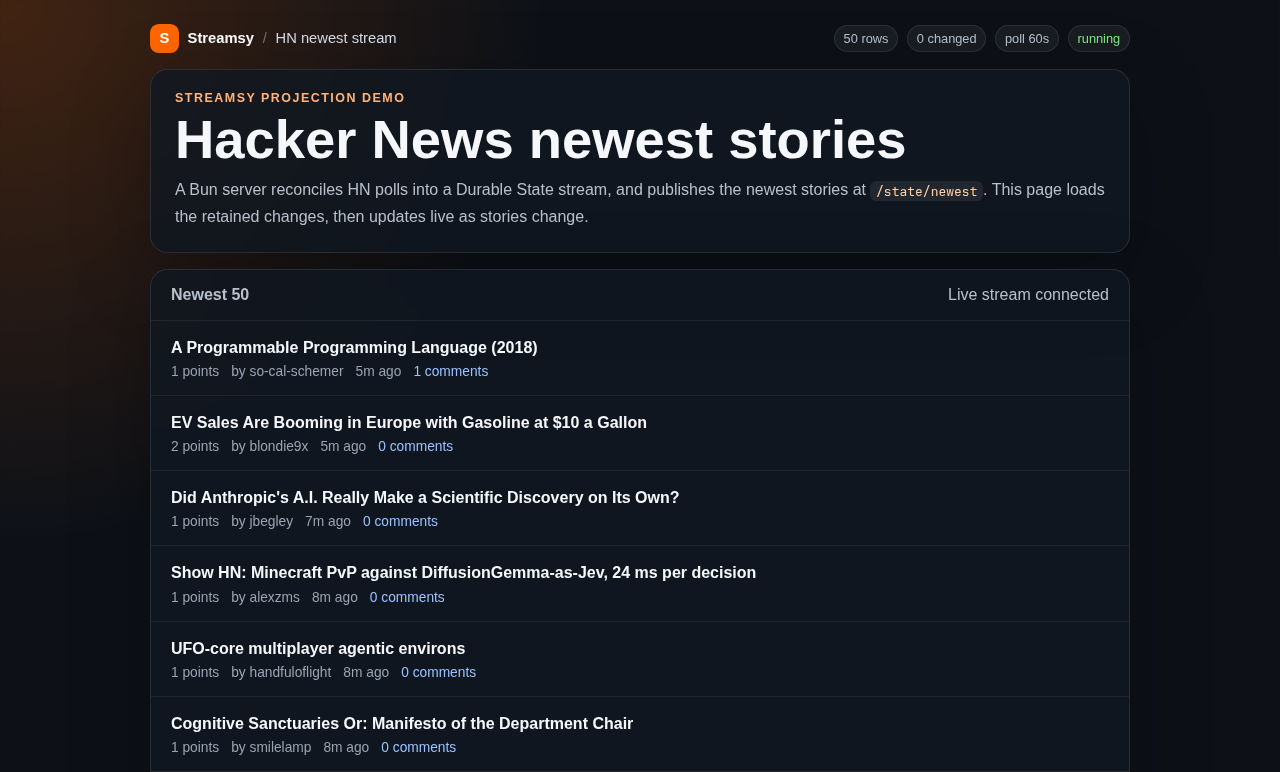
A live list of the 50 newest Hacker News stories. The page updates by itself when a story changes or leaves the list.
This demo shows the 50 newest Hacker News stories on a page that stays up to date by itself. When a story gets a new score, a new title or new comments, its row changes on the page without a reload. When a story leaves the newest 50, its row goes away.
The source is in
examples/hackernews-newest-stream.
Its README lists the environment variables, the status and poll API, and the
offline smoke test.
Run locally
From the repository root:
bun install --frozen-lockfile
bun run build
bun run --cwd examples/hackernews-newest-stream dev
Open http://localhost:1339. The server keeps its data in
.data/hackernews.sqlite. Set HN_DB=memory to keep everything in the process.
Architecture
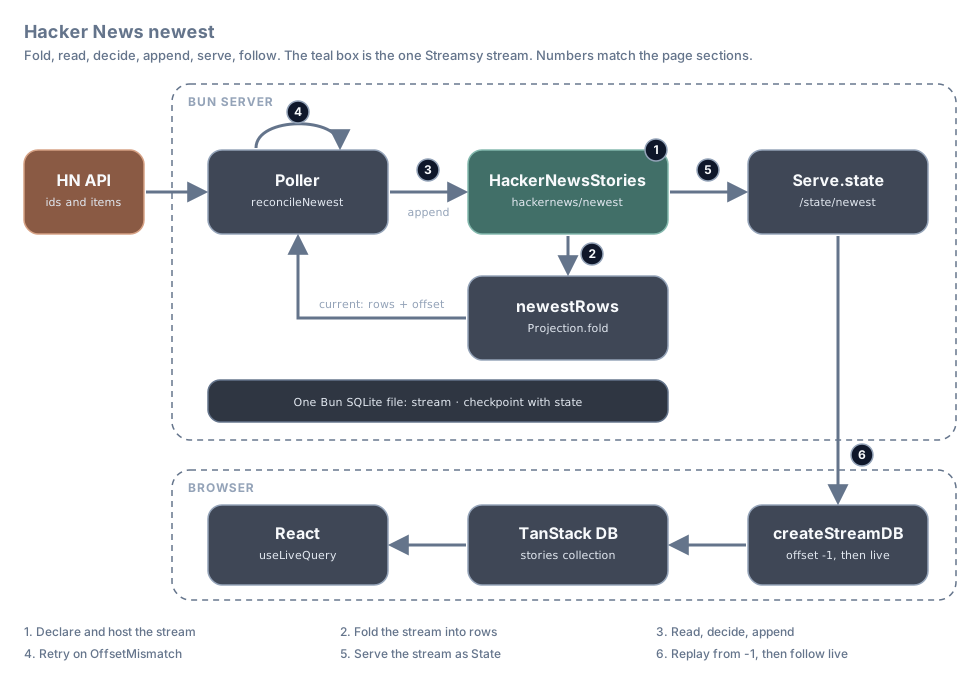
The server polls Hacker News and writes one Durable State stream,
hackernews/newest. A checkpointed fold folds that stream into the current
story rows. Before each append, the poller folds the projection in memory and reads the rows
and the offset they are at, compares them with the fetched stories, and appends
the changes with expectedOffset. Serve.mount publishes the stream at
/state/newest. The React browser reads from -1 into TanStack DB through
createStreamDB, then follows live upserts and deletes.
The poller is the working example of the read, decide, append recipe.
Each number in the diagram is a section below.
| Step | What happens | Streamsy feature | File |
|---|---|---|---|
| 1 | The app declares one State stream and hosts it in SQLite | Streamsy.state, Streamsy.group, BunStorage.layer | stories.ts, streams.ts |
| 2 | A projection folds the stream into story rows | Projection.fold with state and fold | newest-rows.ts |
| 3 | The poller reads the rows and their offset, decides, and appends | Projection.decide | poller/reconcile.ts |
| 4 | A conflict retries the whole pass | OffsetMismatch, retry schedule | poller/poller.ts |
| 5 | The server publishes the stream as Durable State | Serve.mount, Serve.layer, listener, Serve.teardown | http.ts, index.ts |
| 6 | The browser replays the stream, then follows live changes | Durable State client | client/db.ts, client/main.tsx |
The code below is from the demo. Lines marked // ... are left out.
1. Declare and host the stream
The stream has one collection, hn-story, keyed by id. The stream id is
fixed, so the declaration has no params:
export class HackerNewsStories extends Streamsy.state<HackerNewsStories>()(
  "HackerNews/Stories",
  "hackernews/newest",
  { params: {}, collections: { "hn-story": { schema: HackerNewsStory, key: "id" } } },
) {}

export const storiesAddress = HackerNewsStories.at({});
One SQLite file holds the stream. BunStorage.layer stores it, and
CheckpointStore.layer can store projection checkpoints on the same owner.
This demo folds in memory and saves no checkpoints. The app creates the stream at
boot, so the first GET /state/newest?offset=-1 returns 200 with an empty
array before the first poll.
const streams = Streamsy.group(HackerNewsStories);

/** Create before HTTP starts, so a fresh State replay is 200 and empty. */
export const createStoriesLayer = Layer.effectDiscard(
  Effect.flatMap(HackerNewsStories, (stories) => stories.create({})),
);

const storage = (databasePath: string, options: { readonly readLimit?: number } = {}) =>
  databasePath === "memory"
    ? MemoryStorage.layer(streams, options)
    : BunStorage.layer(streams, { ...options, client: { filename: databasePath } });

type HostLayer = Layer.Layer<Streamsy.Host<typeof streams> | CheckpointStore, StorageFault>;

/** The checkpoints join the owner of the stream: one SQLite file, or memory. */
export const host = (
  databasePath: string,
  options: { readonly readLimit?: number } = {},
): HostLayer => CheckpointStore.layer.pipe(Layer.provideMerge(storage(databasePath, options)));
With HN_DB=memory, MemoryStorage.layer(streams, options) takes the place of the
SQLite file. Streamsy.Host<typeof streams> types both branches. The host reads HN_DB through
Config when the layer starts.
See Declare streams and Layers and storage.
2. Fold the stream into rows
The projection folds the stream into one state value, a record of rows by key:
export const StoryRows = Schema.Record(Schema.String, HackerNewsStory);
// ...
export const newestRows = Projection.fold({
  id: "hn-newest-rows",
  params: {},
  inputs: { input: storiesAddress },
  state: { schema: StoryRows, initial: {} },
  fold: (rows, { item }) => applyChange(rows, item),
}).at({});
applyChange is a pure function. An upsert sets the row at its key, and a
delete removes it. current returns the value and matching offsets without saving a checkpoint.
The newest set holds about 50 rows, so one state value is small enough. See
State and checkpoints for when to use application tables
in its place.
The projection has no outputs. The stream that it reads is the stream that the browser follows.
3. Read, decide, append
Each pass fetches the newest ids and their stories once. reconcileNewest then
does the recipe with one Projection.decide call. It folds the checkpoint and input tail in memory, reads the rows and the offset of input, and appends the events with that
offset as expectedOffset. No change gives no events, so nothing is appended
and the tail is not checked:
export const reconcileNewest = (
  fetched: FetchResult,
  retry: Schedule.Schedule<unknown, OffsetMismatch>,
) =>
  Projection.decide(newestRows, {
    input: "input",
    decide: ({ state: rows, offsets }) => {
      const changes = diffNewest(rows, fetched);
      // No change gives no events: `decide` then appends nothing and does not check the tail.
      const events = DurableState.changes(storiesAddress, { offset: offsets.input }, changes);

      return Effect.succeed({
        value: { rows: Array.reduce(events, rows, applyChange), changes },
        items: events,
      });
    },
    retry,
  }).pipe(
    Effect.map(({ value, offset }) => ({ ...value, offset })),
    Effect.withSpan("NewestStoriesPoller.reconcile"),
  );
diffNewest is the decision. It deletes rows whose ids left the newest set,
and upserts new or changed stories. An unchanged story gives no change. If a
story fetch fails, the row stays while its id is still in the newest set.
See Read, decide, append.
4. Retry on a conflict
After an OffsetMismatch, Projection.decide folds and decides again,
up to three times. The poller passes the schedule as retry. It does not fetch
from Hacker News again:
const pass = Effect.gen(function* () {
  // ... fetch the newest ids and their stories once, into `fetched` ...
  // A retry folds and decides again, so the diff uses the new rows.
  const { rows, changes, offset } = yield* reconcileNewest(fetched, conflictRetries);
  // ... record the counters ...
});
conflictRetries is Schedule.recurs(3) with a tap that counts each retry in
the status counters:
// Up to three retries after `OffsetMismatch`, so at most four appends per pass.
const conflictRetries = Schedule.recurs(3).pipe(
  Schedule.tap(() =>
    Ref.update(countersRef, (counters) => ({
      ...counters,
      totalConflictsRetried: counters.totalConflictsRetried + 1,
    })),
  ),
);
After the last retry, status records the error and the next scheduled poll tries again. Other errors are not retried.
See Write.
5. Serve the stream
The State route serves the stream itself:
export const stateRoute = Serve.mount(HackerNewsStories, streamPath);

/** The page and State route share an origin, so no CORS middleware is needed. */
export const app = Layer.mergeAll(
  stateRoute,
  // ... the status and poll API, and the static page ...
);
Serve.layer hosts the page, the State route and the status and poll API
on one scoped Bun listener. They share an origin and need no CORS middleware.
There are no raw /streams routes; only the server appends. The poller has a
scoped lifetime. There is no background watcher: the poller folds the projection in memory when it needs a current view.
listener keeps a parked long poll open. On shutdown, Serve.layer answers
each live read before the router closes. Serve.teardown then exits 0:
const serverLayer = Serve.layer(app, { disableLogger: true }).pipe(
  Layer.provide(pollerLayer.pipe(Layer.provideMerge(demoHostLayer))),
  Layer.provide(listenerLayer),
);

BunRuntime.runMain(Layer.launch(serverLayer), { teardown: Serve.teardown });
You can read the route with curl:
curl -i 'http://localhost:1339/state/newest?offset=-1'See Serve routes.
6. Follow the stream in the browser
The state schema maps the hn-story type to a stories collection with id
as the key:
export const hackerNewsState = createStateSchema({
  stories: {
    schema: Schema.toStandardSchemaV1(HackerNewsStory),
    type: "hn-story",
    primaryKey: "id",
  },
});
createStreamDB opens the route. It reads from offset -1 to replay every
retained change, then long-polls for new ones:
export function createHnDb(origin: string) {
  return createStreamDB({
    streamOptions: {
      url: new URL("/state/newest", origin).toString(),
      contentType: "application/json",
      headers: { [STATE_VERSION_HEADER]: "1" },
      warnOnHttp: false,
    },
    live: "long-poll",
    state: hackerNewsState,
  });
}
React reads the collection with useLiveQuery. When a change arrives, TanStack
DB updates the collection and React renders the list again. The page has no
fetch code for stories.
function HnApp({ db }: { db: HnDb }) {
  const storiesQuery = useLiveQuery((q) => q.from({ stories: db.collections.stories }));

  const stories = useMemo(
    () => Array.sort(storiesQuery.data ?? [], newestStoryOrder),
    [storiesQuery.data],
  );
  // ...
          Array.map(stories, (story) => <StoryRow key={story.id} story={story} />)
Limits
- There is no snapshot. New sessions replay all retained changes, and history must remain available. A retention cap alone loses rows.
- After a server reset, reload the page to open a fresh collection from
-1. Automatic reopening is not implemented. - The
@durable-streams/state0.3.1 binding merges an upsert on a known key. Fields omitted by a later row keep their old browser values, live and on replay. - A pass with no changes appends nothing, so it does not check the tail. The next poll reconciles later writes.
expectedOffsetrefuses a stale append, but it does not order the Hacker News fetches of two processes by freshness. Steady contention can use up the three retries.HN_DB=memorystarts fresh after every restart.- The demo has no hosted deployment. See Cloudflare for the host path.
The poller has no projection follower. Each decide folds from the start when no checkpoint exists and writes no checkpoint. Retained history must remain available.