Fold agent
Run an AI agent whose session log lives in a stream, so a session can resume after a crash and two processes cannot both write it.
This demo is a small command-line agent. You give it a prompt, it answers and can call one tool. Later you can resume the same session from another process, or print its log. Fold Core runs the agent loop. Streamsy stores the session log in one stream. Each append names the end of the log that the writer read, so a stale process cannot add entries after another process has moved on. The demo has no browser, so this page has no screenshot.
The full source is in examples/fold-agent.
Run it
From the repository root:
bun install --frozen-lockfile
bun run build
bun run --cwd examples/fold-agent start "How long is 'hello'?"
start needs an OpenAI or Anthropic API key, and prints the session's stream id. The log goes to the SQLite file examples/fold-agent/.data/agent.sqlite. Set FOLD_AGENT_DB to choose another file. The example README lists the other settings, including a scripted model that needs no key. Resume or print a session with its stream id:
bun run --cwd examples/fold-agent resume <stream-id> "What happened?"
bun run --cwd examples/fold-agent inspect <stream-id>
Architecture
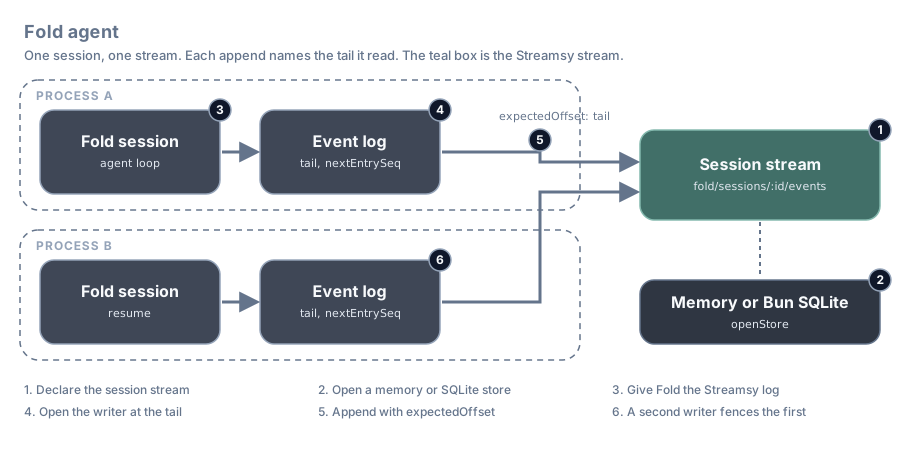
Each number in the diagram is also a section number below.
| Step | What happens | Streamsy feature | File |
|---|---|---|---|
| 1 | One stream for each session holds the Fold log | Streamsy.json | src/session-log.ts |
| 2 | The same code opens a memory or a SQLite store | MemoryStorage.layer, BunStorage.layer | src/storage.ts |
| 3 | Fold writes its log through the Streamsy adapter | Fold eventLogSource | src/cli.ts, src/streamsy-event-log.ts |
| 4 | A writer reads the log and keeps its tail offset | read | src/streamsy-event-log.ts |
| 5 | Each append names that tail | append with expectedOffset | src/streamsy-event-log.ts |
| 6 | A second process moves the tail and fences the first | OffsetMismatch | test/sqlite-restart.test.ts |
The code below is from the demo. Lines marked // ... are left out.
1. Declare the session stream
A session uses one JSON stream, fold/sessions/<session>/events. The template parameter uses Fold's SessionId schema, so Sessions.parse accepts only real session ids. The CLI uses it to check the stream id that you give to resume and inspect.
export class Sessions extends Streamsy.json<Sessions>()(
  "Fold/Sessions",
  "fold/sessions/:session/events",
  { params: { session: SessionId }, schema: Schema.Json },
) {}
See Declare streams.
2. Open a store
storeLayer gives the same Sessions service on the memory host or on Bun SQLite. The CLI uses SQLite, so a session outlives the process. Each command provides the Layer, so the store closes when the command ends.
export const storeLayer = (options: StoreOptions = {}): Layer.Layer<Sessions, StorageFault> => {
  const filename = options.filename;

  return filename === undefined || filename === ":memory:"
    ? memoryLayer(options)
    : sqliteLayer(filename, options);
};
See Layers and storage.
3. Give Fold the Streamsy log
Fold owns the loop, the tool calls and the conversation. It asks for an event log, and the demo gives it one that is backed by the session stream.
const start = Command.make("start", { prompt: promptArgument }, ({ prompt }) =>
  Effect.gen(function* () {
    const model = yield* configuredModel;
    const session = SessionId.create();

    return yield* withStore(
      Effect.scoped(
        Effect.gen(function* () {
          const fold = yield* startSession({
            agent: exampleAgent(model),
            log: yield* streamsyEventLog({ session, mode: "create" }),
            sessionId: session,
            cwd: process.cwd(),
          });

          yield* fold.send(prompt);
    // ...
resume works in the same way, with resumeSession and mode: "resume". The commands use effect/cli, so Ctrl-C interrupts the turn and the store closes.
4. Open the writer at the tail
When a writer opens, it reads the whole log. It checks Fold's sequence numbers and keeps two values: the stream offset after the last entry, and the next sequence number.
export const readHistory = Effect.fn("Fold.readHistory")(function* (params: SessionParams) {
  return yield* (yield* Sessions).collect(params);
});export const makeEventLog = (options: StreamsyEventLogOptions) =>
Effect.gen(function* () {
const sessions = yield* Sessions;
// ...
const history = yield* readHistory(params);
const decoded = yield* decodeLog(history.items);
if (options.mode === "resume" && decoded.length === 0)
return yield* unavailable("Cannot resume a log with no Fold entries");
let tail = history.offset;
let nextEntrySeq = decoded.length;
const lock = yield* Semaphore.make(1);
let fenced = false;5. Append with expectedOffset
Each append passes the stored tail as expectedOffset. If the stream still ends there, the append succeeds and the writer moves its tail forward. If another writer appended first, the stream answers OffsetMismatch and the adapter reports "Fenced". The adapter sets fenced before the append and clears it only after a success. After any failed append, the writer refuses to write again. The caller must open a new writer from the durable log.
    const append = Effect.fn("Fold.EventLog.append")((input: LogEntryInput) =>
      lock.withPermit(
        Effect.gen(function* () {
          if (fenced) return yield* unavailable("This writer is fenced; resume from the log");
          // ...
          fenced = true;

          const result = yield* sessions
            .append(params, [json], { expectedOffset: tail })
            .pipe(
              Effect.catchTag("OffsetMismatch", () =>
                unavailable("Fenced: another writer advanced the log"),
              ),
            );

          tail = result.offset;
          nextEntrySeq++;
          fenced = false;

          return entry;
The semaphore keeps the appends of one writer in order. The offset check works across processes, because it is part of the append in the store.
See Conditional writes.
6. A second writer fences the first
The test opens a writer in the test process, then runs a second process that resumes the same session and appends. The next append from the first writer fails. The log then has two entries: the session start and the entry from the second process.
it.effect(
  "a second process that resumes the same session fences the first on its next append",
  () =>
    withTempDir((dir) =>
      Effect.gen(function* () {
        const path = yield* Path.Path;
        const filename = path.join(dir, "agent.sqlite");
        const session = SessionId.create();
        expect((yield* runWorker(["create", filename, session])).exitCode).toBe(0);
        const store = yield* Layer.build(sqliteLayer(filename));

        const first = yield* Effect.scoped(makeEventLog({ session, mode: "resume" })).pipe(
          Effect.provideContext(store),
        );

        const second = yield* runWorker(["append", filename, session, "second process"]);
        expect(second.exitCode).toBe(0);
        // ...
        expect(failure.message).toContain("Fenced: another writer advanced the log");
        expect(
          Array.map(
            yield* readFoldLog(session).pipe(Effect.provideContext(store)),
            (row) => row.seq,
          ),
        ).toEqual([0, 1]);
The other tests run the store contract on memory and SQLite, and drive the real CLI in separate processes with the scripted model. Run them with bun run --cwd examples/fold-agent test:unit.
Limits
- A writer reads the whole log when it opens, so recovery time grows with the log. There are no snapshots and no retention.
- If the process stops after a model call and before its append commits, the next turn calls the model again. A provider request in progress is not recovered.
- A fenced writer stays fenced. The demo does not retry or merge. The caller opens a new writer from the log.
- The demo has no HTTP surface. Its SQLite process tests are its smoke tests.
@humanlayer/fold-coredeclares an exact Effect4.0.0peer. The workspace override pins one Effect4.0.1copy for it, and the tests cover that combination.